
If you spend a lot of time at your desk—maybe for work, gaming, or creative projects—having a monitor that sounds as good as it looks can really take your whole setup up a notch. Acer, a name that’s been around in the display market for a while, does offer monitors with builtin speakers. These builtin speakers are practical, especially if you don’t want to bother with extra speakers or just want less desk clutter. Here’s my guide to understanding what Acer offers in this area, how to check if an Acer monitor has speakers, and some options worth checking out.
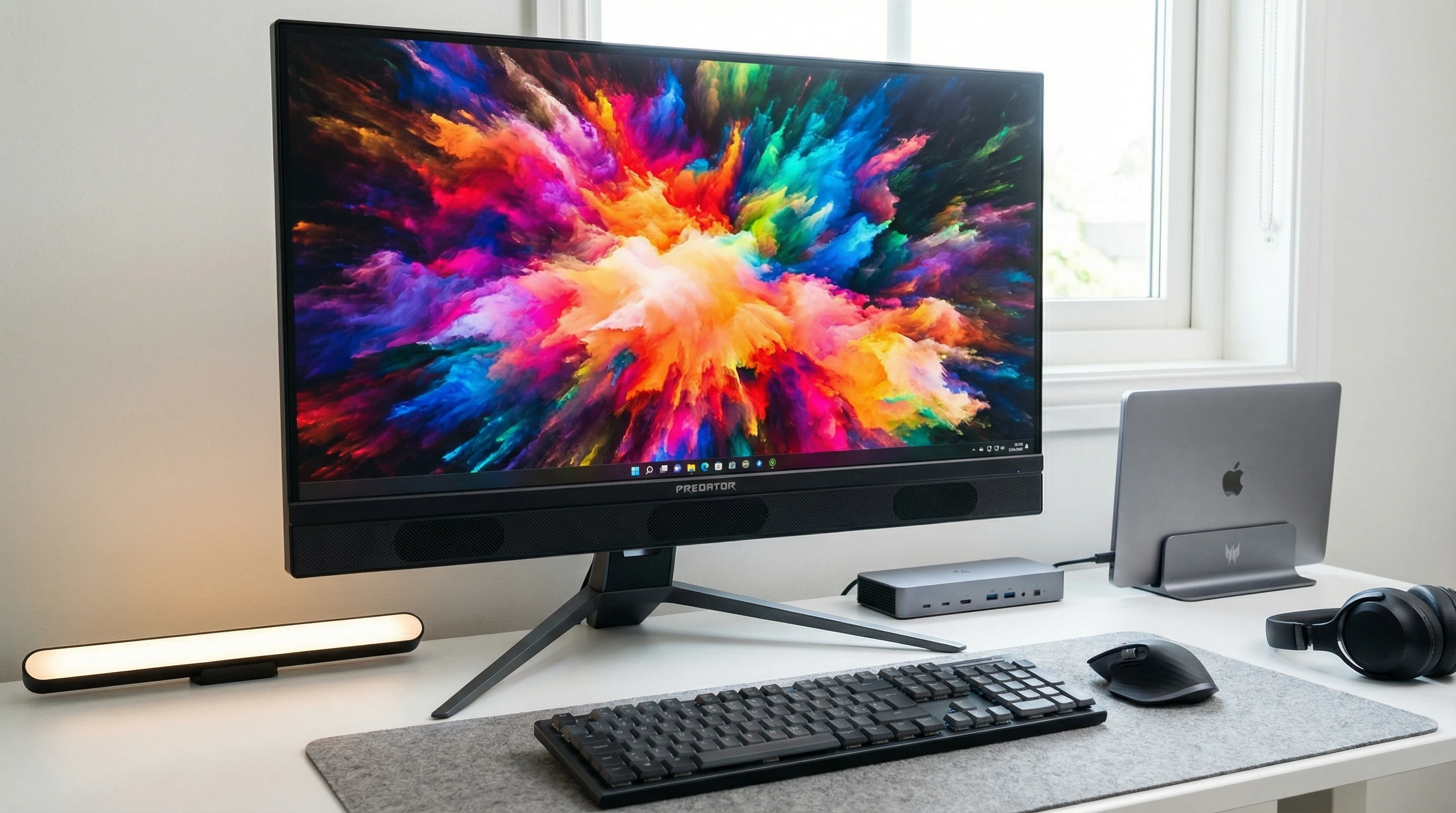
Why Builtin Speakers Make Monitors More Convenient
Adding builtin speakers to a monitor can save both space and money. It’s super useful if you work in a small office, share a workspace, or just don’t want the hassle of external speakers and cables. Builtin speakers also come in handy for casual listening, like Zoom calls, streaming a YouTube video, or background music while you work.
Acer has monitors across price ranges, and many of their models come with decent integrated speakers. It’s important to mention that these speakers are usually not going to blow you away if you’re an audiophile, but they’re totally fine for daytoday use, work calls, and light entertainment.
How To Know If Your Acer Monitor Has Speakers
Checking if your Acer monitor has builtin speakers is actually pretty straightforward. Here are a few simple ways to find out:
- Check the monitor: Look for small speaker grill openings along the bottom, sides, or back of the monitor. Sometimes you’ll see them labeled with a little speaker icon.
- Check the official specifications: Head to Acer’s official website and search for your monitor model. The specs will list if speakers are included, along with their wattage.
- Look in the user manual: If you still have the manual, it should clearly mention audio features.
- Check for an audio input: Monitors with speakers often have a 3.5mm audio input (besides HDMI or DisplayPort), or sometimes a headphone jack for audio passthrough. HDMI or DisplayPort will transmit both video and audio, but only if the monitor actually supports sound output.
- Test it out: Plug in an HDMI or DisplayPort cable from your PC. Play an audio file and select the monitor as your PC’s output device. If you hear sound, congrats. Your monitor has builtin speakers!
I’ve personally tripped up on this myself, mistaking a headphone jack for proof of builtin speakers, so always doublecheck the official specs if you want to be certain.
Typical Uses: When Builtin Speakers Shine (and When They Don’t)
Builtin speakers are great for a bunch of everyday uses. Here are a few scenarios where they make life so much easier:
- Video calls: No need for separate speakers when hopping into a meeting or class online.
- Watching videos: Handy for streaming shows or sports without cluttering your workspace.
- Quick gaming sessions: They work for casual gaming, especially if you don’t want to break out headphones for every round.
- Desk tidiness: No extra speakers mean less gear to dust and maintain.
Of course, these speakers do have their limits. For serious gaming, music production, or home theater setups, you’ll probably want something with a bit more power and clarity. But they really do hit the spot for business, light media use, and a distractionfree workspace.
5 Best Acer Monitors With Builtin Speakers
I’ve rounded up a list of Acer monitors that do a pretty solid job at blending display quality with reliable builtin speakers. Here’s a quick look at five options that cover a range of budgets and needs:
- Acer Nitro VG271U
This 27inch IPS monitor is gamerfriendly with a 144Hz refresh rate and sharp WQHD (2560×1440) resolution. The 2W builtin speakers are quite decent for ingame effects and everyday sound. - Acer SB220Q bi
This is a 21.5inch ultrathin budget option. Sound from the integrated speakers is basic, but it’s still really useful for students or anyone setting up a compact study nook. - Acer R240HY bidx
Perfect for office users, this 23.8inch IPS monitor delivers good colors and crispness. The speakers aren’t loud but absolutely get the job done for presentations and casual browsing. - Acer Predator XB273K
This one is for creators and gamers who want a premium option. It’s a 27inch 4K monitor with GSync. The builtin speakers are better than average on this model, which makes quick gaming or editing sessions a little more convenient. - Acer V277U
A 27inch 1440p monitor that strikes a balance between size, visual clarity, and sound output. It’s a solid pick for professionals, and the audio is rich enough for web calls and the occasional playlist.
This list isn’t exhaustive. Acer releases new models pretty often, so check official Acer product pages for the latest availability and features. Some models now come with extras like USBChubs or adjustable stands, which can further streamline your workspace. Newer monitors may feature enhanced sound modes, letting you adjust for music, movie, or gaming automatically, making them even more versatile for home offices or dorm rooms.
What To Look For When Picking an Acer Monitor With Speakers
When you’re shopping for an Acer monitor and you want builtin sound, here are a few practical things that make a difference:
- Speaker wattage: Most range between 15W per speaker, which is enough for personal use but won’t fill a big room.
- Audio inputs: Make sure the monitor supports audio via HDMI or DisplayPort, and doublecheck for a headphone passthrough if you want private listening.
- Your use case: If you mainly join Zoom calls, any basic Acer model with speakers does the trick. Gamers and movie lovers will want something that covers a wider frequency range and offers at least stereo sound.
- Ease of access: Check if you can easily adjust volume from your monitor’s buttons or via your system settings.
- Display features: Prioritize screen quality first, then see if the audio fits your needs. You don’t want to compromise on visuals.
Reading reviews from other buyers helps a lot, as realworld feedback often points out how the builtin speakers actually sound in daily use. If you can test out the monitor in person at a store, that’s even better. Volume and clarity levels can be subjective, so your own ears may tell a different story than the product specs alone.
Common Questions About Acer Monitors With Builtin Speakers
I get a lot of questions from friends and readers about builtin speakers, so here are a few that come up a lot:
Do Acer monitors always include builtin speakers?
No, not all models do. Entrylevel and businessfocused monitors often have them, but some highend gaming and professional models skip them entirely. Always check the specs just to make sure.
Are Acer monitor speakers good enough for gaming or movies?
They’re fine for casual use, but for immersive gaming or movie sound, they’re no replacement for a set of dedicated desktop speakers or good headphones. If you want nextlevel cool sound effects or rumbling bass, you’ll want external speakers.
How do I set up sound on my Acer monitor?
For HDMI or DisplayPort connections, your computer needs to send audio over the cable. Just select your monitor as the audio playback device in your OS sound settings. With VGA or DVI, those don’t carry audio, so you’ll need to use the 3.5mm audioin port if the monitor supports it.
Can I improve the sound coming from my Acer monitor’s builtin speakers?
You can tweak audio settings on your PC, but the speakers themselves are pretty basic. For louder or richer sound, consider adding compact external speakers or using a good pair of headphones for a quick upgrade. Some people use small soundbars designed for monitors to get a boost without taking up much desk space.
RealWorld Example: Who Benefits Most From Builtin Speakers?
For freelancers, students, and anyone who works from a compact desk, monitors with builtin speakers just make everything simpler. For example, I use an Acer monitor with speakers in my home office for video calls and background music, so there’s less to plug and unplug every day. I’ve also set up similar monitors for family members who are less techsavvy—they appreciate not having to worry about additional tech and cables.
Some classrooms and conference rooms use Acer monitors this way too. Builtin speakers handle basic audio tasks for presentations, meaning there are fewer things to troubleshoot before meetings or classes start. Retail stores or small offices that need quick audio for alert sounds or customer announcements can benefit, since they don’t have to budget or set up separate speaker kits. Even creative pros sometimes use builtin speakers as a backup or for editing when portability matters.
Should You Rely on Builtin Speakers?
Builtin speakers in Acer monitors are practical for everyday tasks, but they shouldn’t be your only sound source if you care a lot about audio quality. For most office, school, and light home setups, though, they save desk space and setup time, making them a feature worth considering if you want a tidy, simple workspace. They are great if you just need to check out a quick video, jump into a virtual meeting, or play background music while working. But if sound is a big part of your workflow—say you edit podcasts, DJ, or host movie nights—you’ll want more powerful gear.
If you want more information about models and their sound quality, product reviews on sites like RTINGS or the official Acer monitors page are pretty handy to check out before buying.
With careful research and a clear understanding of your needs, you can find an Acer monitor with builtin speakers that fits right into your workflow or study setup. No need to deal with tangled speaker cables or extra expenses if you just need clear, simple sound right from your screen. If you’re in the market for a monitor that makes things streamlined and organized, these models are definitely worth a look.